 Customer Support
 Contact Sales

 About
About


Glossary of Terms
The glossary is still being populated with new steps and information.
Accounts
Control > CRM > Accounts
The Accounts screen is an important part of the CRM.
It displays all the accounts / clients that you have set up.
For more information, please read the following guides:
Account Import & Export
Control > Security > Account Export
The Account Export screen allows you to export accounts filtered by Account Type, Account Manager or Topic. If you want a full export, simply click the save button.
Control > Security > Account Import
The Account Export screen allows you to import your accounts and tag them with keywords.
For more information, please read the following guide
Account Merge
Control > Security > Account Merge
The Account Merge screen alows you to merge two duplicate accounts.
All of the information is transferred to the target account.
Account Profiles
Control > Security > Account Profiles
The Account Profile screen is where you configure the Account listing and detail template.
For more information, please read the following guide:
Accounts Report
Control > Analyse > Accounts Report
The Accounts Report lets you dive into the key engagement metrics for your accounts.
For more information, please read the following guide:
Articles
Control > Content > Articles
Articles live within a section.
Example:
- Channel: Sports
- Section: Volleyball
- Article: "St Mary's wins university champonship"
Articles can be media items or written articles (with media items as well).
The Articles screen allows you to sort through existing articles and also create/edit articles.
When you create an article you must set its presentation style and also the section under which the item will reside.
For more information, please read the following guides:
- Zones, Channels, Sections, Items et al
- Importing and Exporting Articles
- Creating Multi-Format Responsive Articles
- Article Attribute Guide
- Site Analysis Guide
Article Steps
Catalogue Items
Control > Commerce > Catalogue Items
These are your eCommerce Items, generated from Standard Articles (Product Presentation Style) and various Media Types.
For more information, please read the following guides:
- Importing and Exporting Catalogue Items
- Catalogue Items Guide
- Catalogue Group Guide
- Coupon and Discount Guide
Channels
Control > Structure > Channels
Channels are at the top of the heirarchy when it comes to site structure.
When you create a channel you must select the type (i.e.).
Your channel will contain Sections which in turn contain articles.
Example:
- Channel: Sports
- Section: Volleybal
- Article: "UCSB men's team defeats BYU in three sets"
You can see all the channel types on the Templates page on Demo.
For more information, please read the following guide:
Client Campaign and Dashboard
The Client Campaign functionality is designed to provide a comprehensive, self-service platform for managing and analyzing marketing campaigns for clients. It enables the creation, monitoring, and reporting of various campaign elements such as Ad Campaigns, Message Campaigns, Content Campaigns, Activities, and Lead Generation, all within a unified dashboard environment.
The associated Client Campaign Dashboard serves as a live, real-time interface where authorized client team members can log in at any time to view all key statistics related to their campaigns. This includes metrics like campaign leads, message opens and clicks, ad impressions and clicks, content views and consumption, and conversion activities. The dashboard is highly interactive and user-friendly, featuring responsive design for tablets and mobiles, light and dark modes, and the ability to export data in spreadsheet formats with custom date ranges.
Key purposes and features include:
Self-Service Analytics: Clients can independently access up-to-date campaign statistics without needing manual reports from the service provider, improving productivity and transparency.
Comprehensive Campaign Management: The dashboard integrates multiple campaign components—messages, ads, content, leads, and activities—allowing clients to see a holistic view of their marketing efforts.
Customizable and Dynamic: Campaigns can be set up with various elements such as message campaigns, ad campaigns, contact lists for leads, conversion events, and content creators or sections. The dashboard dynamically updates to show only relevant stats and navigation based on the campaign's configuration.
Lead Management: Clients can export new batches of leads directly from the dashboard, with options to display or hide personal information fields as configured.
Security and Access Control: The system supports fine-grained security settings, ensuring that only authorized client contacts and management personnel can access specific campaign dashboards and data.
Ease of Setup and Maintenance: Campaigns are designed to run with minimal ongoing administration. Affino automatically populates content, creatives, messages, and lead lists as campaigns evolve, while also allowing manual additions.
Integration and Migration Support: The Client Campaign system supports external campaign IDs, facilitating migration from third-party platforms or parallel use alongside them.
Download and Export Management: Users receive email notifications when exports are ready, and can access downloads directly within the dashboard interface, with downloads available for a limited time.
Advanced Visualization: The dashboard includes multiple tabs such as Overview, Leads, Ad Campaigns, Content Campaigns, Message Campaigns, and Activities, each presenting detailed, sortable, and filterable data.
In summary, the Client Campaign functionality and its dashboard provide a powerful, integrated solution for clients to monitor and manage their marketing campaigns efficiently, with real-time insights, secure access, and self-service capabilities that reduce manual intervention and enhance client engagement.
Coupons
Control > Commerce > Coupons
Set up and manage coupons that are based on Quantity, Value and Shipping.
For more information, please read the following guide:
Member Listing
Display (front end).
This screen is used to list your contacts as members of your site.
Users can connect with other contacts and message them.
Example: demo.affino.com/members/
Message Campaigns and Messages
Message Campaigns and Messages serve as a powerful and flexible messaging system designed to manage and automate bulk communications across multiple channels such as Premium messages, SMS, and Personal messages.
Their primary purpose is to enable organizations to create, schedule, and send targeted messages to specific audiences with nuanced filtering capabilities.
Key purposes and features of Message Campaigns and Messages include:
Bulk Messaging with Advanced Filtering: Message Campaigns allow sending one-off or recurring bulk messages with highly detailed filters. These filters can include mailing lists, security groups, accounts, contact lists, demographic criteria (job title, gender, country, topics), and more, ensuring messages reach the intended recipients.
Automated and Triggered Messaging: Campaigns can be set up to act as auto-responders or notifiers triggered by Conversion Events, such as purchases or other user actions. This enables timely, relevant communication based on user behavior.
Integration with Mailing Lists and Preferences: Mailing Lists act as smart subscriber lists that track subscriptions and unsubscriptions. Message Campaigns respect user permissions and marketing preferences, including excluding contacts who have opted out or triggered specific conversion events, ensuring compliance and relevance.
Message Types and Formats: Campaigns support different message formats and types, such as Newsletters, Notifications, Promotional Campaigns, and Auto Renewal Campaigns. This classification helps in organizing campaigns and tailoring content appropriately.
Comprehensive Analytics and Reporting: Affino provides enhanced analysis tools for Message Campaigns, including reach estimation, message opens, clicks, click-through rates (CTR), and conversion tracking. This allows marketers to monitor campaign effectiveness and optimize future communications.
Simplified Message Creation and Management: Users can create messages linked to campaigns, with settings inherited and override options for fine control. Campaigns support creative (ads) placements and template management to streamline message design and reduce errors.
Support for Testing and Scheduling: Messages support A/B testing, open rate calculations, scheduled versus manual sends, and test message sending to ensure quality and effectiveness before full deployment.
Handling of Bounce and Delivery Issues: Bounce handling is fully SSL encrypted and integrated with Gmail/Google Apps accounts, improving deliverability and tracking.
In summary, Message Campaigns and Message provide a unified, automated, and highly customizable framework within Affino to manage all aspects of bulk messaging, from audience targeting and message creation to delivery and analytics, supporting both manual and event-driven communication strategies.
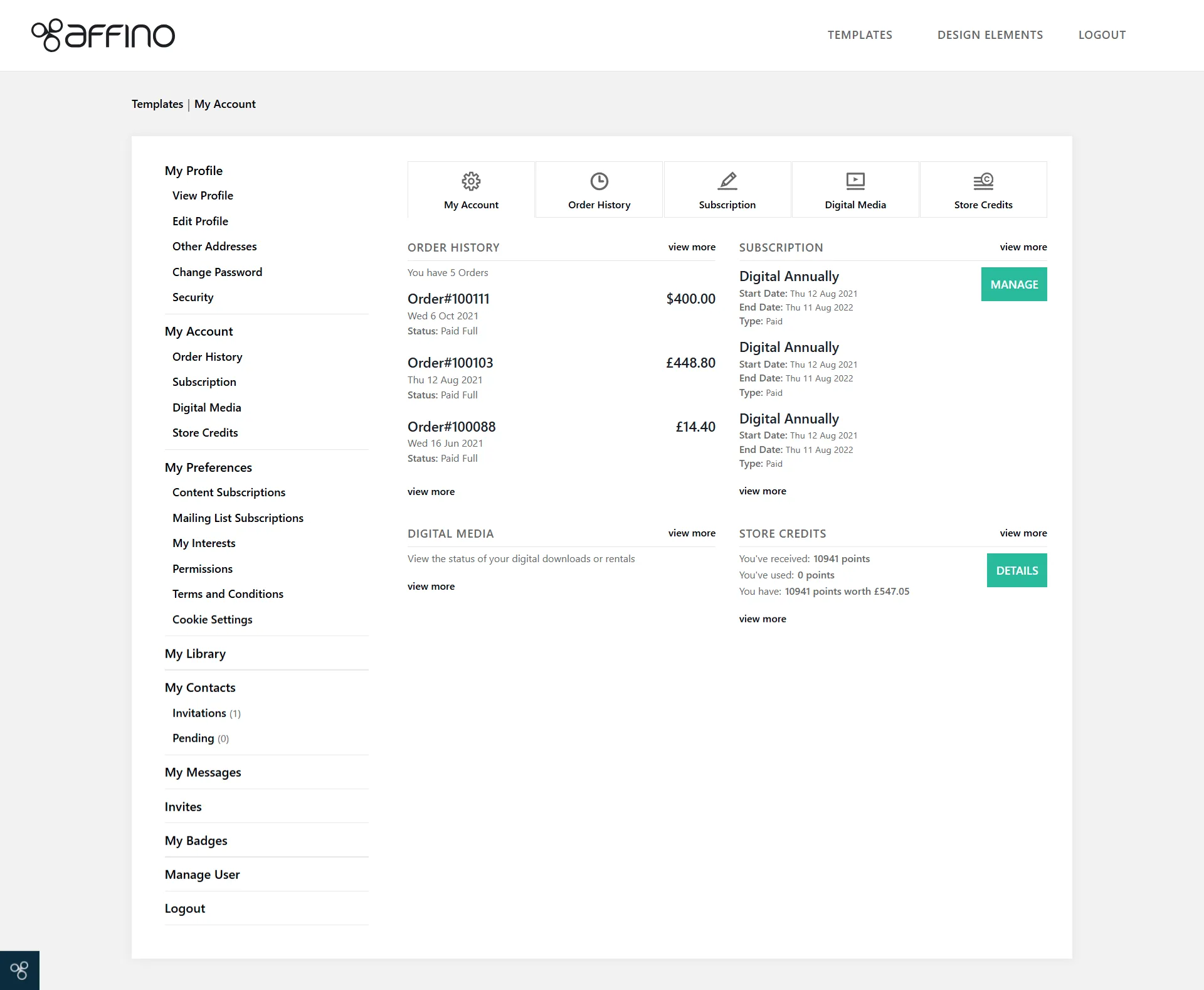
My Account
Display side (front end).
These screens allow users to manage their site settings, personal account information and preferences.
Orders
Control > Commerce > Orders
Here you can review and manage your eCommerce and pro forma related orders.
These can be exported to a CSV.
For more information, please read the following guides:
Pro Formas
Control > Commerce Pro Forma Orders
This screen handles the creation and management of pro forma orders, which are tied to Orders.
The preliminary invoices are sent to buyers before the final sale.
Sections
Control > Structure > Sections
Sections are your secondary level of navigation.
Example:
- Channel: Sports
- Section: Volleyball
- Article: "St Mary's wins university champonship"
Sections contain a specific group or collection of content items / media / articles .
When you create a section you must select the content type.
For more information, please read the following guide:
Skins
Control > Design > Skins
This screen manages the visual design and layout of your site, allowing customization of the user interface on the display side / front end.
Topic Lists
Topics are hierarchical categories which are used to identify, indicate and filter content.
For more information, please read the following guides:
- Topics and Topic Manager Reference Guide
- Topic Channel Setup Guide
- Topic Template on Demo (link)
Zones
Control > Structure > Zones
A Zone is a specifically grouped collection of Channels (i.e. a site)
It is a volume of Channels typically associated with a unique domain URL and language.
Example:
- Zone (site): UK News
- Channel: Sports
- Section: Volleyball
- Article: "St Mary's wins university champonship"
Your Affino instance can contain several zones as well.
Example:
- Zone 1: Volleyball Headquarters
- Zone 2: Basketball News
- Zone 3: Futbol Insider
When you create a zone you will need to have set up a corresponding User Profile.
Control > Security > User Profiles
Note: the user profile can not be changed after the Zone has been created.
For more information, please read the following guide:
- Zones, Channels, Sections, Items et al
- I need to create a new Zone, what steps do I take?
- How do I encrypt my site (zone)?
Did you find this content useful?
Thank you for your input
Thank you for your feedback

Driving business at some of the world's most forward thinking companies










Our Chosen Charity


Meetings:
Google Meet and Zoom
Venue:
Soho House, Soho Works +
Registered Office:
55 Bathurst Mews
London, UK
W2 2SB
© Affino 2026