 Customer Support
 Contact Sales

 About
About


Assign Security Groups
The Assign Security Groups screen is designed to enable bulk assignment of users from various sources—specifically Contact Lists, Accounts, or existing Security Groups—to a target Security Group.
This functionality facilitates managing user access and permissions efficiently, especially useful for scenarios such as memberships, subscriptions, or event participants where groups of users need access to certain content or features.
Key Features and Purposes
Use Cases:
This feature is particularly useful for managing memberships, contact lists, or accounts where groups of users need to be granted access to specific content or permissions efficiently.
Bulk Assignment:
Users from the selected sources are assigned to the target Security Group in bulk. If a user already has the target Security Group, they are skipped to avoid duplication.
Source and Target Panels:
The interface is divided into a Source panel (where you select Contact Lists, Security Groups, or Accounts as the source of users) and an Assign panel (where you select the Target Security Group to assign users to).
System Security Rights Validation:
Before saving, Affino checks if the target Security Group has any System Security Rights and warns the administrator with a modal popup listing those rights, ensuring awareness of the access level being granted.
User Notifications:
When the scheduled task runs, a message is displayed on the screen indicating the process is underway, and an email is sent upon completion to confirm the assignment.
Scheduled Task for Large Assignments:
If more than 100 contacts are involved, the assignment process runs as a scheduled task to prevent timeouts and performance issues. Users are notified by email once the task completes.
Fields and Settings
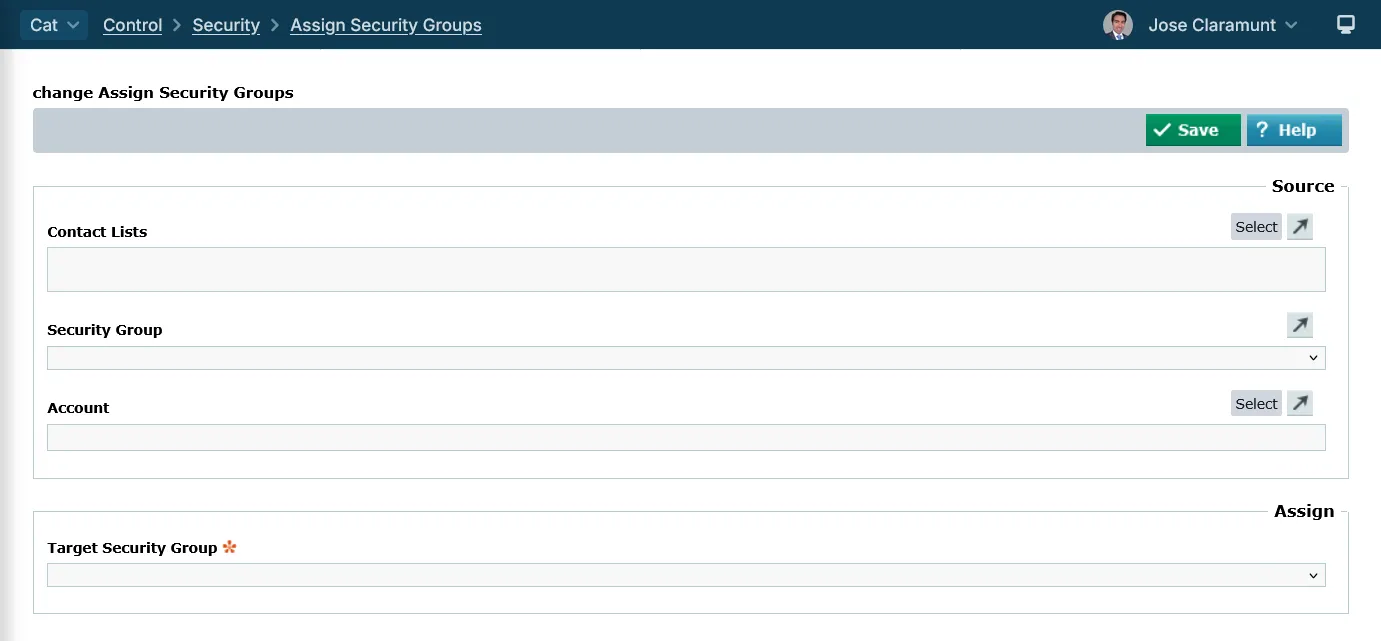
Control > Security > Assign Security Groups
- Contact Lists: Select the Contact Lists to assign to a Security Group
- Security Group: Select the Security Group of users to assign to another Security Group
- Account: Select the Account to assign to a Security Group. Only active Contacts on the Account will be assigned the Security Group
- Target Security Group: Select the Group you wish to assign the users to
Did you find this content useful?
Thank you for your input
Thank you for your feedback

Driving business at some of the world's most forward thinking companies











Our Chosen Charity


Meetings:
Google Meet and Zoom
Venue:
Soho House, Soho Works +
Registered Office:
55 Bathurst Mews
London, UK
W2 2SB
© Affino 2026