 Customer Support
 Contact Sales

 About
About


Mailing List Subscriber Import Guide
The Mailing List Subscriber Import allows you to import contacts in bulk and subscribe, unsubscribe and/or remove them to one or more Mailing Lists.
If the contact isnt in the CRM, they will be created as a new Mailing List type user.
In summary, you will need to:
- Download and prepare the sample file for import
- Select the mailing list(s) you wish the contacts to subscribe or unsubscribe to
- Select the Action to take (Subscribe Users, Unsubscribe Users, Remove Users)
- Choose to Update Unsubscribed Users or not
- Select the User Profile
- Save (import)
Tip: Make sure you click on Help and download the latest sample XLSX file.
Please be aware that the import is limited to 10,000 records at a time.
The format used for the import file is XLSX.
The required/obligatory fields for the import are:
- FirstName
- LastName
The rest of the fields are:
- PrimaryAddress1
- PrimaryAddress2
- PrimaryTownCity
- PrimaryCountyState
- PrimaryISOCode
- PrimaryCountry
- PrimaryPostcodeZip
- DeliveryAddress1
- DeliveryAddress2
- DeliveryTownCity
- DeliveryCountyState
- DeliveryISOCode
- DeliveryCountry
- DeliveryPostcodeZip
- Topic
- PermissionCode
- PermissionDate
- Source
Quick Start
Mailing list subscriber import lets you bulk-add contacts to a list from a CSV. Useful for migrating from another ESP, restoring from a backup, or seeding a new list from an existing dataset.
The minimum setup:
- Prepare a CSV with columns: email (required), first/last name, and any custom fields the list captures.
- Upload via Control - Mailing List - Import. Affino validates emails and shows a preview before commit.
- Choose how to handle duplicates - skip, update, or replace.
- Run the import. Each row creates or updates a contact and adds them to the list.
Imports are append-only by default; use the update flag for refreshing existing records.
Options and Settings
The Mailing List Subscriber Import screen has several options for subscribing, unsubscribing and removing contacts from a Mailing List (or more than one) in bulk.
Select the ones that apply to your needs.
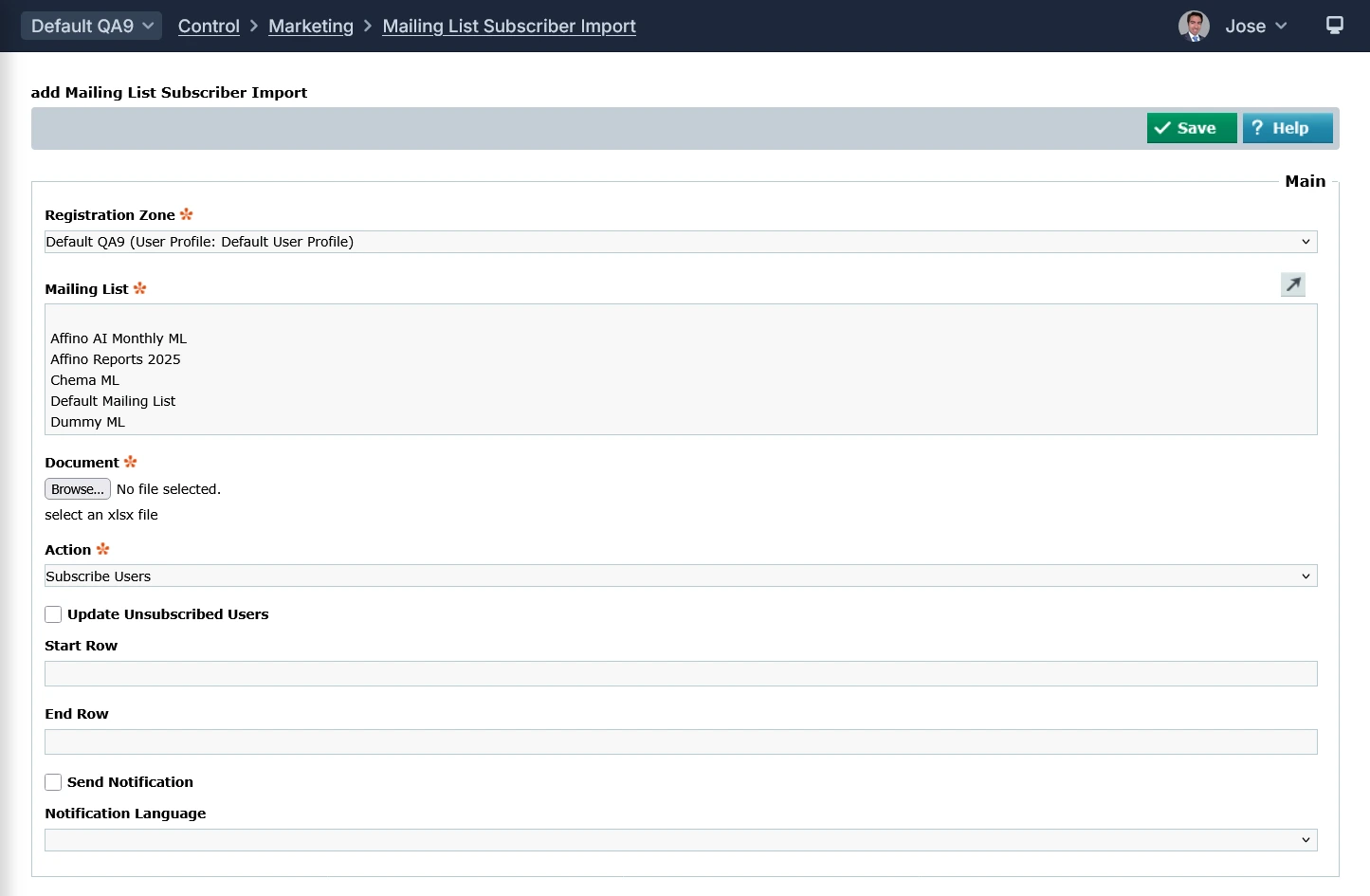
- Registration Zone: Select the Registration Zone for this Contact. This is used to associate the contact to the designated User Profile, Registration and Demographic Profiles and also display the relevant Topic List for topic targeting. Note: You will only be able to set this field once, it cannot be changed later.
- Mailing List: Select from the scroll-down menu the Mailing List you would like to import the subscribers for.
- Document: select an XLSX file for the import (remember to download the sample file)
- Action: Select to subscribe users to the selected mailing list(s), unsubscribe (still shown on the contact record) or remove them from the mailing list (not shown on the contact record whether they were previously subscribed or unsubscribed)
- Update Unsubscribed Users: Used with the Subscribe action, select to subscribe users previously unsubscribed from the selected mailing list(s). If not selected, unsubscribed users will not be processed in the import
- Start Row: Enter the row that you want to start importing from. This is useful when you have a long list and different elements of the list have different settings. If you do not enter a Start Row, then the import will start on row 1
- End Row: Enter the row that you want to end importing from. This is useful when you have a long list and different elements of the list have different settings. If you do not enter a End Row, then the import will end on the final row
- Send Notification: Check this option if you wish users to receive an email confirmation of their subscribe/unsubscribe. This will include the name of the Mailing Lists
- Notification Language: Use the drop-down menu to select the notification language
Rules and Notifications
Rules:
- If a user is already in the CRM and active, they are assigned to the selected mailing list(s)
- If a user has been archived, they are unarchived first and then subscribed to the mailing list (s)
- If the email already exists and the "Update Unsubscribed Users" checkbox is not ticked, the user is skipped
Notifications:
- Affino sends an email notification listing any users who were not imported due to being unsubscribed or archived
Alternatives to bulk import
The bulk import described above remains the right tool for one-off datasets - historical contact lists, event-attendee imports, ad-hoc migrations from another platform. Two additional paths now sit alongside it for steady-state list management:
- Zapier Mailing List method - subscribe, unsubscribe, or update membership in response to events on another platform. Idempotent. Best for low-volume, real-time list maintenance triggered by external systems. See the Zapier Integration Guide.
- Customer Signals automation - when a contact triggers a Customer Signal (formerly Conversion Events), they can be automatically subscribed or unsubscribed from a list as part of the signal's downstream actions. Best for behaviour-driven list management. See the Customer Signals Guide.
Pick the bulk import when you have rows in a spreadsheet. Pick Zapier when you have an external system that should drive list state. Pick Customer Signals when you want list state to follow on-platform behaviour.
Best Practices
Run a small sample import first (50-100 rows). Verify email parsing, custom-field mapping, and duplicate handling before committing the full file.
Set the import's source field to identify the batch. When subscribers later complain or unsubscribe at unusual rates, the source flag lets you trace the cohort.
Use double opt-in for imported addresses you didn't directly collect. Importing "borrowed" lists without opt-in risks ESP-level deliverability damage.
For large imports (10K+), split into batches of 5K. Single uploads at scale risk timeout and partial-write states.
Gotchas
Imported subscriptions don't auto-trigger welcome emails unless the list is configured with a welcome flow. Operators expecting "subscribe" automation to fire on import will see no emails sent.
Duplicate detection is case-insensitive on email but case-sensitive on custom fields. A row with email: A@B.com matches a@b.com but a "Company" field in different casing creates a duplicate.
Bulk imports trigger Aborting messages on heavily-customised forms. If the list's subscription form has client-side validation for fields the import doesn't supply, the import marks affected rows as aborted. Run import bypassing the form, not through it.
Did you find this content useful?
Thank you for your input
Thank you for your feedback

Driving business at some of the world's most forward thinking companies











Our Chosen Charity


Meetings:
Google Meet and Zoom
Venue:
Soho House, Soho Works +
Registered Office:
55 Bathurst Mews
London, UK
W2 2SB
© Affino 2026