 Customer Support
 Contact Sales

 About
About


Setting up Content Metering / Paywall
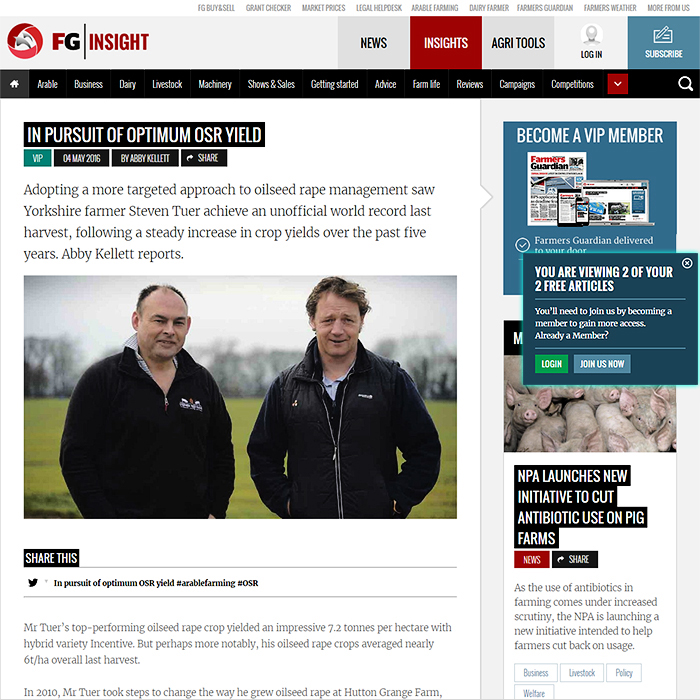
(Above screen-shot with Metering in right hand column taken from FG Insight)
Overview
Content Metering is an essential tool to encourage member registrations and up-sell. It works through assigned Content Security Rights and Assigned User / Member Security Groups - such that certain User Groups get limited access to specified content. All metered content needs to have a Security Right assigned to it. Using different Security Rights and Different Security Groups allows you to build up an aspirational / incremental approach to content display / viewing.
Elements and Dependencies
- Content Security Rights - For assigning to Article Content to enable Metering Restrictions
- Design Script - Custom Up-Sell Design Scripts assigned to Level above the one that the restriction is on - i.e. the one you are up-selling to - prompt to incentivise users to register / sign up for membership / VIP etc.
- Design Style - Used for text formatting etc. for the pop-up notification panels
- Levels - The Individual Metering Levels - usually at least two
- Message Campaign - You can select Message Campaign Bypass so that Metered content referred to in Newsletter gets a single viewing free pass
- Metering Profile - Master Metering Profile which contains typically several Metering Levels (per User / Security Group)
- Security Group - The assigned Security Group per target User Group - be careful not to assign Metering Rights to the wrong Security Group as you may inadvertently disable the Metering
- Zone - Metering Profiles are assigned per Affino Zone
Uses
Metering is currently enabled for controlling / limiting standard content / article access - with a view to encouraging users to register or sign up for membership to increase their levels of access. Note that you can have several different Metering Levels (usually minimum of 2), commonly 3 or 4, but you can only have one Metering Profile per Zone - which means all Metering Levels within that Profile are linear. This means for example that you cannot have two different access limits for a certain level per User Group - all Access Levels are linear and per User Group.
Advisory
There is some degree of complexity here, you need to get into the mindset of limited permission levels and up-sell to get a firm understanding. It’s all about encouraging users to upgrade themselves to the next level - whether that be registration or paid-for membership. That's why we refer to this as a linear and singular workflow. You cannot for instance apply two different security rights for the same User Group / Security Group Level - with the intention of permitting 10 views on one type of article and only 5 views on another. Even if the logic was possible, it would be totally confusing for the Consumer / reader who would then seemingly jump from 9 articles left to view, to only 3 left on their next turn.
Procedure
Follow the numbered steps below, and reference the Elements and Dependencies recorded above - remembering User / Security Group access levels permitted via limited access permission to Secured Articles. You are in effect offering a limited by-pass of a Certain Security Group for a certain User Viewing Group.
1: Create Metering Profile
Complete key fields:
- Name - Reference Name / Title for this Profile
- Zone - Select which Zone this Metering Profile applies to (1 Metering Profile per Zone)
- Design Style - Select the Design Style which styles the Metering Panel Text, the same Design Style needs to be assigned on the relevant Skin/s too as 'Additional Design Style'
- Show Text - Select to display the Teaser, Introduction and Main Body (Text 1) of the metered article
- Show Fade - Select to fade the last two lines of text of the metered article
- Show Main Image - Select to display the Main Image from the metered article when the metering wall is hit.
- Show Login Form To Guests - Select to display the login form for guest users
- Hide Premium Content Icon - Select to the Hide Premium Content Icon on listing templates and design elements. Once users reach the metering gate, Affino will reinstate the Secure Content Padlock on articles.
- Bypass Referral Domains - Enter a comma separated domain list that allows a one page view when referred through - e.g. for search-engine indexing - google.com, google.co.uk, bing.com, bing.co.uk for instance
- [_] Message Campaign Bypass - Select to let users view links from message campaigns even if the pages are secured
2: Create Metering Levels
e.g.:
- Level 1 = Guest (Not logged-in) | Level = Guest User | Security Clearance = Registered User | Views = 2 | Timeframe = 20
- Level 2 = Registered User (User that has Registered) | Level = Registered User | Security Clearance = Registered User | Views = 5 | Timeframe = 20
- Level 3 = Member (User who has paid for Membership / Subscription) | Level = Subscription | Security Clearance = Member | Views = 5 | Timeframe = 20
- Level 4 = VIP Member (Higher level Membership / Subscription) } Level = Subscription " Security Clearance = VIP | Views = 100
etc.
NOTE - As the Up-sell is always on the aspirated / higher level, you need a MINIMUM 2 Levels to make Metering work.
In the above example, once you get to Member level, the metering occurs for a higher level of content, i.e. restriction always applies to the level of above, which in this instance could be ’Member’ / ’VIP’, which would also be assigned to Subscription Level.
There are two key enabling elements for this - Content Security Rights and Security Group
All Metered Articles must have Content Security Right assigned to them, and the User must belong to a specified Security Group. For the level of Metering, the Security Right should not be assigned to the corresponding Security Group, but a higher level one which overrides the Paywall. Security is based on Articles and Security Groups only, and should not be assigned to Article Sections.
Entry Fields:
- Name - Enter Name pertinent to Metering Level, e.g. Guest User, Registered User, Member, VIP Member
- Level - Principally for house-keeping purposes - select corresponding Level to Name - in our example the first two are per Name, and the latter two would be ’Subscription’ i.e. Member Status
- Sort Order [Sort]: Place Levels in appropriate order
- Security Group - Select relevant Security Group for intended target audience - so for Guest User = Guest etc. be careful not to assign Level Security Clearance to said same Security Group - they enable different things, and the latter would override the metering
- Content Security Right - Select up to 5 Content Security Rights. This determines what secured content users at this level have access to on Metering in addition to content they have available through security assigned to them directly or via their group memberships.
- Metered Page Views - Select the number of days the user can view secured metered content in. I.e. Users are able to view 3 page views (Metered Page Views) in 7 days.
- Meter Timeframe: For how many days the Metered Page Views apply - e.g. 7 entered here with 2 for Metered Page Views - means 2 articles per week for Guest User Level
- Viewing Message - Self-explanatory default text included - You are viewing [x] of your [y] free articles
- Limit Reached Message - Self-explanatory default text included - You have viewed all of your [y] free articles today | To continue reading this article | please register or subscribe
- Up-Sell Design Script - Custom Script assigned to encourage Users to move up a level, sits on Level above, e.g. Message intended for Guest User is assigned as Script on Registered User Level or above.
NOTE - as all Affino customers require different formats of Sell-up Panel, this has been implemented as a custom design script - which means its content and look-and-feel needs to be specified / designed and it needs to be put in place by a developer really or someone with fairly advanced coding skills.
Changing an active Meter Time Frame
Metering Level Function Logic
This is how Affino handles its metering logic, in regards to changes to the Meter Time Frame for free article views (i.e. when the Meter Time Frame is altered from 30 days to 365 days).
This explanation details how the logic affects users who have already consumed some or all of their free article allowance and how the renewal period is anchored.
Explanation of Current Logic
Affino records the date and time when a logged-in user first views a metered article. For guest users, this information is stored in a browser cookie
Affino also tracks which articles the user has viewed, either as a single value or a list (depending on the allowed number of views)
Each time a user views a new metered article, Affino:
Checks the date of the first view
Counts the number of articles viewed
If the user is within the allowed number of views and within the allowed timeframe, the view is permitted
If the allowed timeframe has passed since the first view, Affino:
Resets the first view date to null
Clears the list of metered articles
Sets the current date as the new first view date and logs the current article
Scenarios
Scenario 1:
You change the Meter Time Frame from 30 days to 365 days when a user still has 1 free page view left
The user now has 365 days (from the date of their first metered view) to use this remaining free page, not just the original 29 days
Scenario 2:
The user has already used all their free pages, having have zero left
The free page allowance will renew 365 days after the date of the first metered view, not in 335 days (which would have been the remainder of the original 30-day cycle)
Scenario Analysis
| S | User Activity | Metering Change | Resulting Allowance | Renewal Period |
|---|---|---|---|---|
| 1 | User has used 2 of 3 free pages on day 1 of a 30-day cycle | Meter Time Frame changed to 3 pages per 365 days (same allowance) | User has 1 free page left | 365 days from first view |
| 2 | User has used all 3 free pages on day 30 of a 30-day cycle | Meter Time Frame changed to 3 pages per 365 days | User has 0 free pages left | Allowance renews in 365 days from the first view |
How the Timeframe Is Anchored
The renewal period is always anchored to the date of the user's first metered view
When the metering period (Meter Time Frame) is changed (e.g., from 30 days to 365 days), Affino does not retroactively adjust the start date. Instead, it simply extends the window for the current cycle to the new period length
Once the new period (e.g., 365 days) has elapsed since the first metered view, the user's allowance is reset: the first view date is cleared, the list of viewed articles is reset, and the process starts over with the next article viewed
Summary
The Metering Level logic is user-centric and time-anchored: the period for free views always starts from the user's first metered article view, and any changes to the period length apply immediately to the current cycle. The remaining article allowance and renewal timing are recalculated based on the new period, not the original timeframe.
2b: Up-Sell Design Script Example
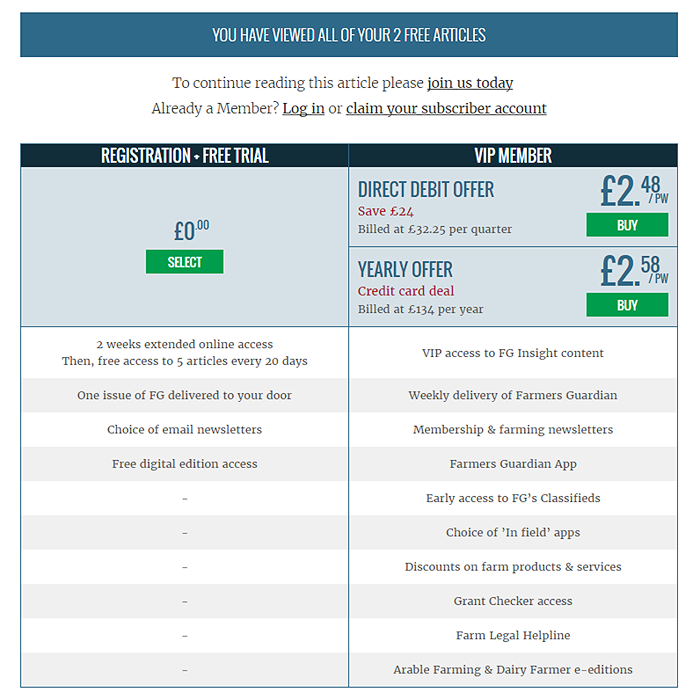
Up Sell-Design Scripts tend to be entirely custom per site because of wholly different requirements and desired outlook. They are typically a paid-for task usually carried out by the Affino Development Team, although some Clients are capable of coding their own.
NOTE - that you can now also assemble your own Up-Sell Panel by simply creating a series of article steps to suits whichever kind of template design you have in mind - you can then select the relevant article as 'Up-Sell Article Steps' rather than using 'Up-Sell Design Script'. Both of these settings are on the Metering Profile Level.
Obviously certain more complex layouts can only be achieved via Scripting, but the majority of our Clients now make use of Article with defined Article Steps.
3: Assign Security to Content
All articles you wish to limit access to must be assigned the relevant Security Clearance (Content Security Right) set on the pertinent level. Metering is applied on an Article basis, so DO NOT try to assign restrictions to Sections - it won't work!
Bypass Metering
Control > Marketing > Message > Metering Bypass > Bypass Metering

Control > CRM > Metering Profile > Bypass > Message Campaign Bypass

The Bypass Metering setting on Messages allows users to bypass the metering gate for article links contained within that specific message. When enabled, article links that are secured and normally subject to metering restrictions become accessible via the message without consuming the user's metered allowance.
Key points:
When the Bypass Metering checkbox is selected (enabled), users who access secured articles through links in that message can view the full content without their metered article view count being decremented.
This bypass applies only when the user accesses the article via the message link. If the user accesses the article directly or from other sources, normal metering rules apply.
The bypass is independent of the "Message Campaign Bypass" setting on the Metering Profile, meaning you can enable bypass on individual messages or for all messages in a campaign via the Metering Profile.
The bypass works for logged-in users and also for logged-out users.
The bypass only works for articles secured with metering security rights that the user has; it does not bypass all security rights indiscriminately.
In summary, enabling "Bypass Metering" on a Message allows recipients to access secured articles linked in that message without consuming their metered article views, providing flexibility in how metering restrictions are applied for content accessed via messaging.
Troubleshooting
There are typically 2 common mistakes with Metering - the first two here:
- Incorrect assignment of Security Rights on content - i.e. Security Clearance should only be assigned to Articles, does nothing on Sections, yet each article must carry the relevant Security Clearance (Content Security Right)
- Incorrect assignment of Security Rights to Security Group - You would override the Metering if the Security Clearance applied on the content was also applied to the Security Group of that intended target audience. The Security Right can only ever be assigned to the Security Group level above, as it overrides the Security / limit on the article
- Remember that the Metering Limit Scale is singular and linear - you are progressively trying to bump a User Group up to the Next Level of Membership - you cannot have multiple Metering Levels aimed at the same stage of User Group, or use multiple different Security Rights with different Access Limits - the logic won't handle it, and neither will the end-user!
- It's Usually 1 Security Right per Content, per User Group / Security Group per Metering Level - Security Right must never be assigned to same User Level Security Group, as it will simply override the whole mechanics of the Metering
Did you find this content useful?
Thank you for your input
Thank you for your feedback

Driving business at some of the world's most forward thinking companies









Our Chosen Charity


Meetings:
Google Meet and Zoom
Venue:
Soho House, Soho Works +
Registered Office:
55 Bathurst Mews
London, UK
W2 2SB
© Affino 2026