 Customer Support
 Contact Sales

 About
About


Broken Links Guide
Control > Analyse > Broken Links
The Broken Links screen is designed to help administrators monitor and manage broken URLs on their site.
It enables identification of broken links, analysis of their frequency and recency, and facilitates export for redirect creation to improve user experience and SEO.
Listing
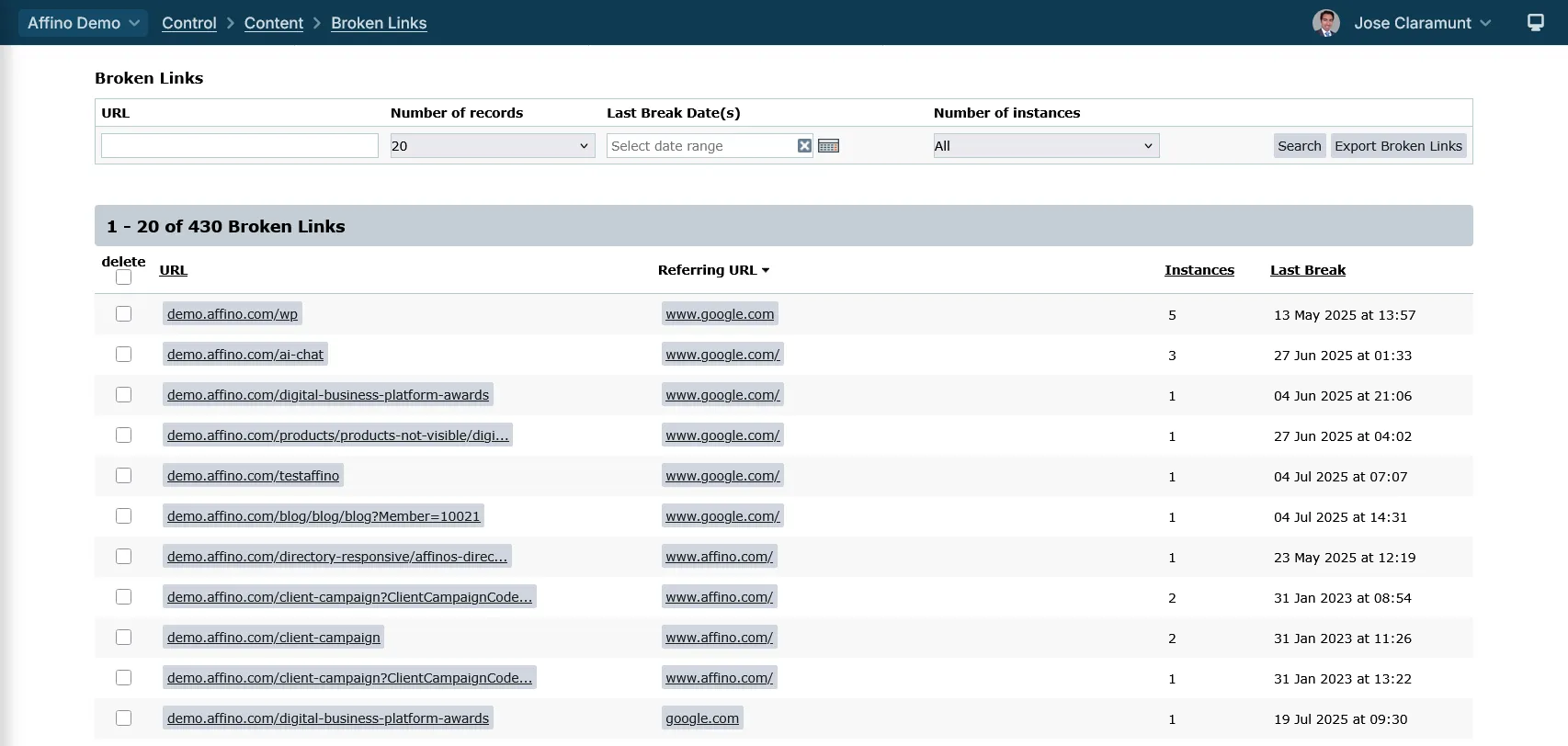
Fields and Options:
- URL: full path including protocol (http/https)
- Referral URL: source of the broken link
- Number of Instances: how many times the link was broken
- Last Break: timestamp of the most recent broken link occurrence
Sorting and Filtering:
- sorting is a one-time selection (you cannot toggle back and forth)
- sort by columns such as Last Break date and Number of Instances
- filter by Date range using "Last Break Date(s)" to specify a timeframe
- filter by Number of Instances filter with options like All, 10, 20, 50, 100, 200, 500, 1000, to focus on frequently broken links
Each page can display up to 500 broken link records.
Buttons:
- Search: click on this button to perform the desired search
- Export Broken Links: export the entire set of broken links or a filtered search of them
Export
Fields and Columns:
- URL: The broken link URL that was accessed.
- Referring URL: The URL from which the broken link was accessed, if available. Sometimes this can be the same as the broken URL, especially if redirects from HTTP to HTTPS are involved.
- Instances: The number of times this broken link has been triggered (i.e., how many hits or impressions it has received).
- Last Break: The timestamp or relative time since the last time this broken link was accessed.
You can export the entire set of broken links or a filtered set of links.
Note:
- you can export up to 5,000 records to a CSV file
- the Exported URLs preserve the full protocol (http or https), which is critical for accurate redirect setup
- the export may include older records not visible on the screen due to pagination limits
Data and Usage Tips
Data Considerations:
The screen shows all-time instances since logging began, whereas Site Analysis 404 impressions are time-bound (e.g., last 7 or 30 days), so numbers may not match exactly
Some discrepancies between broken links and 404 page impressions can occur due to:
- Redirects masking broken links
- Bot filtering and JavaScript requirements for 404 tracking
- Aggregation rules differing between reportsOccasionally, referral URLs may appear identical to the broken link but differ in protocol (http vs https). This can be due to how URLs are stored and processed internally
Usage Tips:
- Use the date range and instances filters to focus on the most critical broken links for your site.
- Regularly export broken links to create redirects and reduce user 404 errors.
- Be aware that some broken links may be caused by bots or malicious activity (e.g., SQL injection attempts), identifiable by unusual URL parameters.
- Monitor referral URLs to understand where broken links originate and address source issues if possible.
Did you find this content useful?
Thank you for your input
Thank you for your feedback

Driving business at some of the world's most forward thinking companies











Our Chosen Charity


Meetings:
Google Meet and Zoom
Venue:
Soho House, Soho Works +
Registered Office:
55 Bathurst Mews
London, UK
W2 2SB
© Affino 2026